Showing posts with label WSO2 ESB. Show all posts

Tuesday, February 19, 2013

Nested Iterator with WSO2ESB

Please find the following sample which demonstrates the Nested iterator.

Following is the source of the configuration.

<?xml version="1.0" encoding="UTF-8"?>
<definitions xmlns="http://ws.apache.org/ns/synapse">
    <registry provider="org.wso2.carbon.mediation.registry.WSO2Registry">
        <parameter name="cachableDuration">15000</parameter>
    </registry>
    <sequence name="IterateMediatorSequence">
        <iterate xmlns:ns="http://org.apache.synapse/xsd" xmlns:ns3="http://org.apache.synapse/xsd" xmlns:m0="http://services.samples" id="iterate1" preservePayload="true" attachPath="//m0:getQuotes" expression="//m0:getQuotes/m0:getQuote">
            <target>
                <sequence>
                    <log level="full">
                        <property name="target1" value="************After 1st Iterate before 2nd Iterate*************"/>
                    </log>
                    <iterate id="iterate2" preservePayload="true" attachPath="//m0:getQuote" expression="//m0:getQuotes/m0:getQuote/m0:request">
                        <target>
                            <sequence>
                                <log level="full">
                                    <property name="target2333" value="************After 2nd Iterate and before payload factory*************"/>
                                </log>
                                <payloadFactory>
                                    <format>
                                        <m0:getQuote>
                                            <m0:request>
                                                <m0:symbol>$1</m0:symbol>
                                            </m0:request>
                                        </m0:getQuote>
                                    </format>
                                    <args>
                                        <arg expression="//m0:getQuote/m0:request/m0:symbol"/>
                                    </args>
                                </payloadFactory>
                                <log level="full">
                                    <property name="target1" value="************after payload factory*************"/>
                                </log>
                                <send>
                                    <endpoint>
                                        <address uri="http://localhost:9001/services/SimpleStockQuoteService"/>
                                    </endpoint>
                                </send>
                            </sequence>
                        </target>
                    </iterate>
                </sequence>
            </target>
        </iterate>
    </sequence>
    <sequence name="aggregateMessages">
        <aggregate id="iterate2">
            <completeCondition>
                <messageCount min="-1" max="-1"/>
            </completeCondition>
            <onComplete xmlns:ns="http://org.apache.synapse/xsd" xmlns:ns3="http://org.apache.synapse/xsd" xmlns:m0="http://services.samples" expression="//m0:getQuoteResponse">
                <log level="full"/>
                <aggregate id="iterate1">
                    <completeCondition>
                        <messageCount min="-1" max="-1"/>
                    </completeCondition>
                    <onComplete expression="//m0:getQuoteResponse">
                        <send/>
                    </onComplete>
                </aggregate>
            </onComplete>
        </aggregate>
    </sequence>
    <sequence name="fault">
        <log level="full">
            <property name="MESSAGE" value="Executing default 'fault' sequence"/>
            <property name="ERROR_CODE" expression="get-property('ERROR_CODE')"/>
            <property name="ERROR_MESSAGE" expression="get-property('ERROR_MESSAGE')"/>
        </log>
        <drop/>
    </sequence>
    <sequence name="main">
        <in>
            <sequence key="IterateMediatorSequence"/>
        </in>
        <out>
            <sequence key="aggregateMessages"/>
        </out>
    </sequence>
</definitions>

Use the following request with soapui in order to test the above sample.

<?xml version='1.0' encoding='utf-8'?>
<soapenv:Envelope xmlns:soapenv="http://schemas.xmlsoap.org/soap/envelope/">
<soapenv:Body>
         <m0:getQuotes xmlns:m0="http://services.samples">
<m0:getQuote>
<m0:request>
<m0:symbol>SUN9</m0:symbol>
</m0:request>
<m0:request>
<m0:symbol>SUN10</m0:symbol>
</m0:request>
</m0:getQuote>
</m0:getQuotes>
</soapenv:Body>
</soapenv:Envelope>


From the second iterate mediator, messages retrieved from the first iterator are again iterated into smaller messages as below

<?xml version='1.0' encoding='utf-8'?>
<soapenv:Envelope xmlns:soapenv="http://schemas.xmlsoap.org/soap/envelope/">
<soapenv:Body>
<m0:getQuote xmlns:m0="http://services.samples">
<m0:request>
<m0:symbol>SUN10</m0:symbol>
</m0:request>
</m0:getQuote>
</soapenv:Body>
</soapenv:Envelope> 

Monday, February 18, 2013

Retrieve values from a xml in config registry with WSO ESB

Configuration given below cane used for this.

<proxy xmlns="http://ws.apache.org/ns/synapse" name="test123" transports="https,http" statistics="disable" trace="disable" startOnLoad="true">
   <target>
      <inSequence>
         <property name="test" expression="get-property('registry','conf:/test.xml')" scope="default" type="OM" />
         <log level="custom">
            <property name="test.b" expression="$ctx:test//b" />
         </log>
      </inSequence>
      <outSequence>
         <send />
      </outSequence>
      <endpoint>
         <address uri="http://localhost:8280/services/Version" />
      </endpoint>
   </target>
   <publishWSDL uri="http://localhost:8280/services/Version?wsdl" />
   <policy key="conf:/repository/axis2/service-groups/test123/services/test123/policies/61afea637b914422e1753dde4e88864cc199fecbb66084e2" />
   <policy key="conf:/repository/axis2/service-groups/test123/services/test123/policies/urn:version" />
</proxy>
                              
Please create a xml file in the config registry with following content.

<a>Hello<b>WSO2</b></a>


You will see the following log

[2013-02-18 23:33:35,690] INFO - LogMediator test.b = WSO2 

Wednesday, December 12, 2012

Respond the client after sending the soap request to the jms queue

This can be achieved with the following configuration.

<?xml version="1.0" encoding="UTF-8"?>
<definitions xmlns="http://ws.apache.org/ns/synapse">
   <registry provider="org.wso2.carbon.mediation.registry.WSO2Registry">
      <parameter name="cachableDuration">15000</parameter>
   </registry>
   <proxy name="StockQuoteProxy"
          transports="http"
          startOnLoad="true"
          trace="disable">
      <description/>
      <target>
         <inSequence>
            <property name="OUT_ONLY" value="true"/>
            <clone>
               <target>
                  <endpoint>
                     <address uri="http://localhost:9000/services/SimpleStockQuoteService"/>
                  </endpoint>
               </target>
               <target sequence="test"/>
            </clone>
         </inSequence>
         <outSequence>
            <send/>
         </outSequence>
      </target>
   </proxy>
   <sequence name="test">
      <payloadFactory>
         <format>
            <ns:a xmlns:ns="http://services.samples">
               <ns:b>Accepted</ns:b>
            </ns:a>
         </format>
      </payloadFactory>
      <property name="HTTP_SC" value="202" scope="axis2"/>
      <header name="To" action="remove"/>
      <property name="RESPONSE" value="true"/>
      <send/>
   </sequence>
   <sequence name="fault">
      <log level="full">
         <property name="MESSAGE" value="Executing default 'fault' sequence"/>
         <property name="ERROR_CODE" expression="get-property('ERROR_CODE')"/>
         <property name="ERROR_MESSAGE" expression="get-property('ERROR_MESSAGE')"/>
      </log>
      <drop/>
   </sequence>
   <sequence name="main">
      <in>
         <log level="full"/>
         <filter source="get-property('To')" regex="http://localhost:9000.*">
            <send/>
         </filter>
      </in>
      <out>
         <send/>
      </out>
      <description>The main sequence for the message mediation</description>
   </sequence>
</definitions>


Please replace the following line according to your end point.
" <address uri="http://localhost:9000/services/SimpleStockQuoteService"/> " 
Chathuranga - Find me on Bloggers.com

Saturday, December 8, 2012

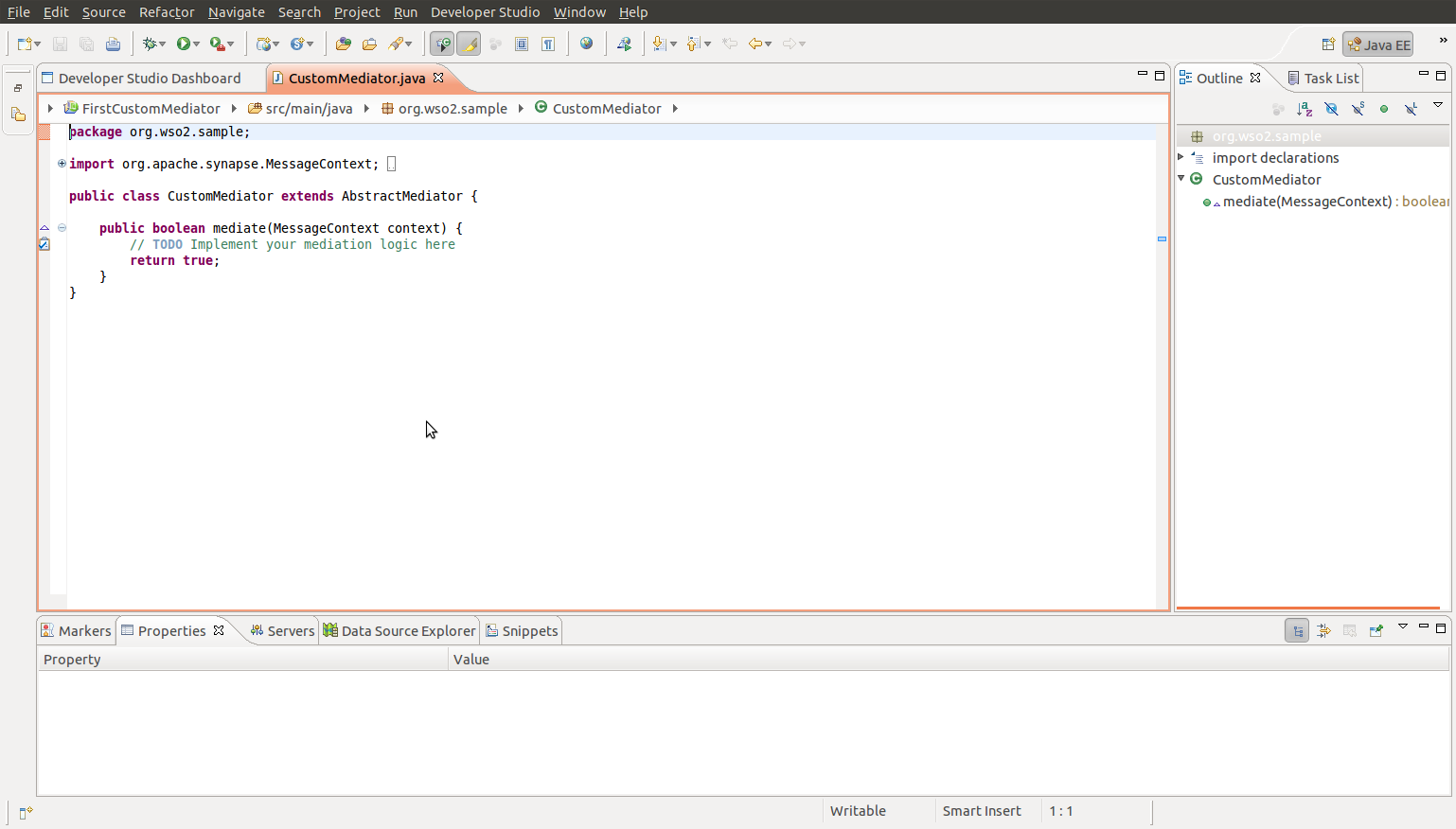
How to write a Custom mediator - WSO2 ESB


I will use WSO2 Developer Studio to write the custom mediator.

Click Developer studio tab and click open dashboard.


You can write the mediator logic in the following. 


Next create a carbon application project.


Next give the project name and select necessary dependencies.


Give a project name and click finish.

Next click "create archive"

Select the location (in file system) , Click 'OK'

Place the mediator (.car) to wso2esb-4.0.3/repository/deployment/server/carbonapps

Following is a sample proxy service which will use a custom mediator.

<proxy xmlns="http://ws.apache.org/ns/synapse" name="test" transports="https,http" statistics="disable" trace="disable" startOnLoad="true">
   <target>
      <inSequence>
         <class name="org.wso2.carbon.sample.FirstMediator" />
         <log level="full" />
         <send>
            <endpoint>
               <address uri="http://localhost:8282/services/SimpleStockQuoteService/" />
            </endpoint>
         </send>
      </inSequence>
      <outSequence>
         <send />
      </outSequence>
   </target>
</proxy>


Friday, December 7, 2012

Manipulating SOAP headers with WSO2 ESB


 <in>
        <header name="To" value="http://localhost:9000/services/SimpleStockQuoteService"/>
  </in>


Prerequisites:
  • Start the Synapse configuration numbered 6: wso2esb-samples -sn 6.
  • Start the Axis2 server and deploy the SimpleStockQuoteService if not already done
Request the stockquote as following

ant stockquote -Dtrpurl=http://localhost:8280/


Proxy Services with WSO2 ESB - ( From Registry )

Recently , i was looking into proxy services from registry and found a blog post about it. So i decided to share it in my blog

WSO2 ESB proxy from registry

If you are new to WSO2 ESB it is recommended to refer following links

Proxy Services with WSO2 ESB
Proxy Services with WSO2 ESB / Monitoring with TCPMon
WSO2 ESB Proxy Services with Custom URLs

Wednesday, November 28, 2012

WSO2 ESB Support of "X-Forwarded-For "

What is X-Forwarded-For

The X-Forwarded-For (XFFHTTP header field is a de facto standard for identifying the originating IP address of a client connecting to a web server through an HTTP proxy or load balancer. This is an HTTP request header which was introduced by the Squid caching proxy server's developers. An effort has been started at IETF for standardizing the Forwarded HTTP header.   [1]

Following will log the value of X-Forwarded-For HTTP header.


<log>
            <property name="xforward-header" expression="$trp:X-Forwarded-For"/>
 </log> 


[1] http://en.wikipedia.org/wiki/X-Forwarded-For

Friday, August 17, 2012

Route messages based on HTTP Headers with WSO2 ESB

Following can be used to route messages based on HTTP Headers.

<proxy xmlns="http://ws.apache.org/ns/synapse" name="test1" transports="https,http" statistics="disable" trace="disable" startOnLoad="true">
   <target>
      <inSequence>
         <log level="custom">
            <property name="log" expression="get-property('transport','Accept')" />
         </log>
         <filter xmlns:ns="http://org.apache.synapse/xsd" source="get-property('transport','Accept')" regex="text/html">
            <then>
               <log level="custom">
                  <property name="test" value="text/html" />
               </log>
               <sequence key="sequence1" />
            </then>
            <else>
               <log level="custom">
                  <property name="test" value="other" />
               </log>
               <sequence key="sequence2" />
            </else>
         </filter>
         <send>
            <endpoint>
               <address uri="http://localhost:9000/services/SimpleStockQuoteService" format="soap12" />
            </endpoint>
         </send>
      </inSequence>
      <outSequence>
         <send />
      </outSequence>
   </target>
</proxy>

More details available at [1]

[1] http://wso2.org/project/esb/java/4.0.3/docs/samples/proxy_samples.html#Sample157 

Friday, August 10, 2012

WSO2 ESB : How propagate the exception to the client

This can be done with the makefault mediator.

<makefault>
            <code value="tns:Receiver" xmlns:tns="http://www.w3.org/2003/05/soap-envelope"/>
            <reason expression="get-property('ERROR_MESSAGE')"/>
        </makefault>


Following proxy is an example


<proxy xmlns="http://ws.apache.org/ns/synapse" name="test11" transports="https,http" statistics="disable" trace="disable" startOnLoad="true">
   <target>
      <inSequence>
         <makefault version="soap12">
            <code xmlns:tns="http://www.w3.org/2003/05/soap-envelope" value="tns:Receiver" />
            <reason expression="get-property('ERROR_MESSAGE')" />
         </makefault>
         <send />
      </inSequence>
      <outSequence>
         <log level="full" />
         <send />
      </outSequence>
   </target>
</proxy>
                               

Wednesday, August 8, 2012

Route traffic using WSO2 ESB - route to a jsp

This blog post provides a basic sample of the $subject.

This can be done with message relay.

Enabling message relay can be done using axis2.xml (repository/conf/axis2.xml). "Message Builders" section and "Message Formatters" section should be modified in order to enable message relay.(enable message relay for the necessary content types).

Use the following configuration in the main sequence.

<sequence xmlns="http://ws.apache.org/ns/synapse" name="main">
   <in>
      <log level="full" />
      <send>
         <endpoint>
            <address uri="http://localhost:8080" />
         </endpoint>
      </send>
   </in>
   <out>
      <send />
   </out>
   <description>The main sequence for the message mediation</description>
</sequence>


<module ref="relay"/> is also used in the axis2.xml. (line 501) 

Access the WSDL for a customURI - WSO2 ESB

The URL of a proxy service can be customized. It is explained at http://achala11.blogspot.com/2012/07/wso2-esb-proxy-services-with-custom.html

Ok,  lets try to access the WSDL.

The WSDL of a custom service url can be accessed from the following workaround.

You can use "main" sequence to route ?wsdl requests to appropriate working WSDL urls.
With this configuration, you can fetch wsdl for proxy service via http://localhost:8280/CustomURL/Part1/Part2?wsdl
If you have multiple proxy services with custom uris, you have to add a <case> statement per proxy service with appropriate wsdl urls.

<proxy xmlns="http://ws.apache.org/ns/synapse" name="CustomerProxy" transports="https,http" statistics="disable" trace="disable" startOnLoad="true">
   <target>
      <outSequence>
         <send />
      </outSequence>
      <endpoint>
         <address uri="http://localhost:8280/services/Version" />
      </endpoint>
   </target>
   <publishWSDL uri="http://localhost:8280/services/Version?wsdl" />
   <parameter name="ServiceURI">/CustomURL/Part1/Part2</parameter>
</proxy>


<sequence xmlns="http://ws.apache.org/ns/synapse" name="main">
   <in>
      <property name="REST_URL_POSTFIX" action="remove" scope="axis2" />
      <switch xmlns:ns="http://org.apache.synapse/xsd" xmlns:ns3="http://org.apache.synapse/xsd" source="get-property('To')">
         <case regex="/CustomURL/Part1/Part2\?wsdl">
            <send>
               <endpoint>
                  <address uri="http://localhost:8280/services/CustomerProxy?wsdl" format="get" />
               </endpoint>
            </send>
         </case>
      </switch>
   </in>
   <out>
      <send />
   </out>
</sequence> 

Using Zotero for academic writing